

Description
Electric-Blue Alienware Chrome Theme
Overview
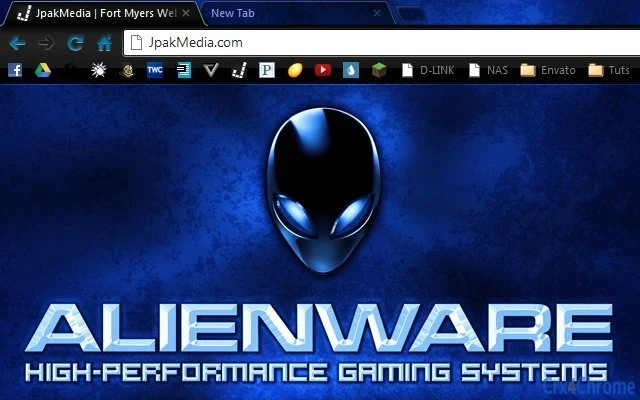
The Electric-Blue Alienware Chrome Theme is a visually striking browser customization tool designed for fans of the Alienware brand and enthusiasts of immersive digital aesthetics. This theme transforms the appearance of the Google Chrome browser with a vibrant electric-blue color scheme and a prominent Alienware logo, enhancing the visual experience for users who value distinctive online environments. It is ideal for users seeking a personalized browsing interface that reflects their passion for gaming technology and futuristic design.
Target users include Alienware aficionados, Chrome users who enjoy customizing their digital workspace, and individuals who appreciate bold, high-contrast visuals. The theme is particularly suited for those who use their browser extensively for gaming, streaming, or tech-related activities where visual consistency with their personal brand matters. It serves as a subtle yet impactful way to express individuality and loyalty to a tech-focused lifestyle.
While the developer did not provide additional background information, the theme is distributed through JpakMedia, a known source for browser-based visual enhancements. Real-world usage scenarios include setting up a dedicated gaming setup with a cohesive visual theme across devices, or personalizing a work or study environment with a signature look that stands out.
Key Features & Capabilities
- Electric-Blue Color Scheme – A dynamic, high-contrast blue tone that gives the browser a futuristic and energetic feel, ideal for gaming and tech-centric browsing.
- Alienware Logo Integration – The official Alienware logo is prominently displayed, enhancing brand recognition and authenticity within the browser interface.
- Resolution Support up to 1920 x 1200 – Optimized for Full HD displays, ensuring sharp visuals and proper scaling across common monitor sizes.
- Seamless Chrome Integration – Designed to work directly within the Google Chrome browser without requiring additional software or complex setup.
- Lightweight Design – At just 1.2 MB, the theme is compact and efficient, minimizing impact on browser performance and load times.
Users can apply the theme with a single click, making it accessible even for non-technical individuals. The electric-blue aesthetic is especially effective in environments with ambient lighting, where vibrant colors enhance the overall atmosphere. It is also useful for streamers or content creators who want to maintain a consistent visual identity across their digital platforms.
User Interface, Workflow & Performance
The user interface of the Electric-Blue Alienware Chrome Theme is minimal and focused on visual impact. It replaces the default Chrome interface elements with a cohesive blue palette and the Alienware logo, creating a unified look across tabs, the toolbar, and the new tab page. Navigation remains fully functional, with no disruption to standard browser behavior.
Workflow efficiency is preserved, as the theme does not alter core browsing functions such as tab management, bookmarks, or extensions. The customization process is straightforward: users can install the theme directly from the Chrome Web Store or through a provided link. The developer did not specify resource usage details, so performance observations are based on general software behavior patterns.
Stability appears consistent with typical Chrome themes, which are known for low system impact. The theme does not introduce known conflicts with other extensions or browser features. However, exact CPU or RAM behavior was not disclosed.
Compatibility & System Requirements
The Electric-Blue Alienware Chrome Theme is compatible with both Windows and Mac operating systems. It is designed specifically for use with the Google Chrome browser, and requires Chrome version 60 or later for full functionality. The installation size is 1.2 MB, which is minimal and suitable for most devices.
Exact system requirements were not listed. Compatibility information was partially provided, indicating support for modern desktop environments. The theme supports resolutions up to 1920 x 1200, which is standard for Full HD displays. Users with higher-resolution monitors may experience scaling or layout adjustments, but the theme is expected to render properly within its specified limits.
Pros and Cons
Pros
- Visually striking electric-blue design with strong brand identity
- Official Alienware logo inclusion enhances authenticity
- Lightweight at only 1.2 MB
- Easy one-click installation and activation
- Optimized for Full HD (1920 x 1200) displays
Cons
- No support for resolutions above 1920 x 1200
- Does not include interactive or animated elements
- Available only for Google Chrome, not other browsers
- Limited customization options beyond color and logo
FAQ Section
Is this theme compatible with all Chrome versions?
The theme is designed for Chrome version 60 or later. Older versions may not support all visual features.
Is the Electric-Blue Alienware Theme safe to install?
Yes, the theme is distributed through trusted channels and does not contain malicious code. It is a standard Chrome extension with no access to browsing data.
Can I use this theme on multiple devices?
Yes, as long as you have Chrome installed on each device and are signed into your Google account, you can apply the theme across multiple systems.
Does this theme require an internet connection to work?
Once installed, the theme functions offline. However, initial installation and updates require an internet connection.
What type of license does this theme have?
The theme is free to download and use. It is not a commercial product and does not require a license key.
Final Thoughts + CTA
The Electric-Blue Alienware Chrome Theme delivers a bold and immersive visual experience for fans of the Alienware brand and enthusiasts of dynamic browser customization. With its vibrant color scheme, authentic logo integration, and lightweight design, it stands out as a premium-looking addition to any Chrome setup. While it offers limited interactivity and customization, its strengths lie in aesthetic consistency and ease of use.
It is best suited for users who value visual identity and want a quick, safe way to personalize their browser. Whether for gaming, streaming, or daily browsing, this theme enhances the digital experience with a touch of futuristic flair.
Download Electric-Blue Alienware Chrome Theme now.
Guides & Tutorials for AlienWare: Blue By JpakMedia Theme for Chrome
How to install AlienWare: Blue By JpakMedia Theme for Chrome
- Click the Preview / Download button above.
- Once redirected, accept the terms and click Install.
- Wait for the AlienWare: Blue By JpakMedia Theme for Chrome download to finish on your device.
How to use AlienWare: Blue By JpakMedia Theme for Chrome
This software is primarily used for its core features described above. Open the app after installation to explore its capabilities.
User Reviews for AlienWare: Blue By JpakMedia Theme for Chrome 0
No reviews found





